Project description
- Language: Python, HTML
- Libraries: folium, pandas, numpy, requests, json
- IDE: Microsoft Visual Studio Code, Jupyter Notebook
- Project type: Data analytics, Web scraping, Map formation, API
- Keywords: Scotland, schools, deprivation, map

Photo by ali elliott on Unsplash
Postcodes API
The available contact information for the schools solely consists of their postcodes and seedcodes. Consequently, in order to accurately locate each school on a map, I required latitude and longitude values for each establishment. In my search for geolocation information, I discovered an open platform called Postcodes IO. This platform offers a free API that allows access to the server and retrieval of geolocation information for every UK postcode. The collected data was presented in a JSON format. To obtain a comprehensive dataset from postcodes.io, I utilized various endpoints of the API, including the following:
- https://api.postcodes.io/postcodes/QUERY — this endpoint allowed me to query a single postcode and get its geo-information.
- https://api.postcodes.io/postcodes/QUERY/validate — this endpoint allowed me to check the validity of the query postcode.
- https://api.postcodes.io/postcodes/terminated_postcodes/QUERY — this endpoint allowed me to check if the postcode has already been terminated.
- https://api.postcodes.io/postcodes/BULK_QUERY — for the very first endpoint, the API also allowed the query of postcodes in a bulk. So, it is possible to request the information of 100 postcodes in a single request call.
Upon completion of the final debugging and error handling process, the Postcodes API caller class object was ultimately concluded and subsequently archived in the designated directory for utilization in the map building application. The object is capable of providing four distinct information points pertaining to each queried postcode, namely: latitude, longitude, city, and zone. The codes necessary for constructing the API caller are available in my GitHub repository and can be accessed accordingly.
Building the API Caller Object
# import necessary libraries
import requests

# create an object to call the API
class PostcodeApi:

    # create initialiser
    def __init__(self):
        self.api = 'https://api.postcodes.io'

    # create a function to check the validity of the input postcode
    def check_validity(self, p):

        val = self.api + '/postcodes/' + p + '/validate' # formulate validity endpoint
        result = requests.get(val).json()['result'] # get the request result

        if result == False: # check if the entered postcode is valid
            print(f'Non-valid post code: {p}')
            return None

        else:
            return True

    # create a function to check if the postcode is terminated
    def check_termination(self, p):

        ter = self.api + '/terminated_postcodes/' + p # formulate termination endpoint
        if requests.get(ter).status_code == 200: # check if the entered postcode is terminated
            print(f'The postcode {p} is terminated.')
            return None

        else:
            return True

### THE REST OF THE CODES FOLLOW THE NEXT
In order to construct the API object, I exclusively utilize the requests library, as it suffices to dispatch requests to the endpoints. Following the definition of the object’s initializer, I proceeded to establish two functions, namely check_validity() and check_termination(), which verify the accuracy of the inputted postcode and its termination status. Both functions transmit the postcode to the pertinent endpoints and assess the call status prior to forwarding it to the postcode endpoint. Subsequently, I developed functions to retrieve information for either a singular postcode or a multitude of postcodes.
# create a function to request the postcode info
    def get_pos_info(self, pos):

        if self.check_termination(pos): # apply validity check
            if self.check_validity(pos): # apply termination check

                q = self.api + '/postcodes/' + pos # formulate the postcode query endpoint

                result = requests.get(q).json()['result'] # collect the result in a JSON format

                lat = result['latitude'] # latitude
                lon = result['longitude'] # longitude
                city = result['admin_district'] # city
                zone = result['parliamentary_constituency'] # zone

                return {'loc' : [lat,lon],  'city' : city, 'zone' : zone} # return the findings

    # create a function to request the bulk postcodes info
    def get_bulk_pos_info(self, pos_bulk):

        # define the URL
        url = self.api + '/postcodes/'

        # define the JSON payload
        data = {"postcodes": pos_bulk}

        # set the headers
        headers = {"Content-Type": "application/json"}

        # send the POST request
        response = requests.post(url, json=data, headers=headers)

        # check the response
        if response.status_code == 200:

            # the request was successful, and you can parse the response JSON
            result = response.json()['result']

            # convert the result into a dictionary format
            result_items = {
                'locs' : [ (r['result']['latitude'], r['result']['longitude']) if r['result'] != None else None
                          for r
                          in result],

                'cities' : [r['result']['admin_district'] if r['result'] != None else None
                            for r
                            in result],

                'zones' : [r['result']['parliamentary_constituency'] if r['result'] != None else None
                           for r
                           in result]
            }
            return result_items

        else:
            # handle if error is encountered
            print(f"Error: {response.status_code} - {response.text}")
            return None
The get_pos_info() function is designed to retrieve information for a single postcode, following a validation process. It returns the latitude, longitude, city, and zone details in a dictionary format. On the other hand, the get_bulk_pos_info() function offers a more advanced functionality by accepting multiple postcodes in bulk. Notably, this function utilizes a different approach as it posts the input bulk of postcodes to the endpoint, rather than making a request to obtain the information. The postcodes are sent in a dictionary format with headers {"Content-Type": "application/json"}. The returned value is a list of information for each entered postcode. Further guidance on sending bulk requests can be found in the postcodes.io documentation.
Getting the Postcodes Data
Considering the existence of more than 2,000 schools and the limitation of the bulk request to accept only 100 postcodes at a time, it became necessary for me to iterate through the schools in batches of 100. The subsequent code effectively manages this task. Prior to this, I had prepared a dictionary named “sch_loc_info” to accommodate the additional information that would be collected.
# create a dictionary to store the collected data
sch_loc_info = {'locs' : [], 'cities' : [], 'zones' : []}


# NOTE: When sending bulk postcodes, the API gate can only take 100 at a time. So, we request info 100 by 100
for i in range(100,len(postcodes),100):

    sch_loc_info_100 = PostcodeApi().get_bulk_pos_info(postcodes[i-100:i]) # request the info for each 100 call
    sch_loc_info['locs'] += sch_loc_info_100['locs'] # store the location info
    sch_loc_info['cities'] +=  sch_loc_info_100['cities'] # store the cities
    sch_loc_info['zones'] += sch_loc_info_100['zones'] # store the zones

    if (len(postcodes) - i) < 100: # include the final call which would have less than 100 postcodes.
        sch_loc_info_less = PostcodeApi().get_bulk_pos_info(postcodes[i:len(postcodes)])

        sch_loc_info['locs'] += sch_loc_info_less['locs']
        sch_loc_info['cities'] +=  sch_loc_info_less['cities']
        sch_loc_info['zones'] += sch_loc_info_less['zones']
Building the Map
The open-source folium library from Python was utilized to construct the map, with HTML being employed to enhance its features. The codes utilized to create the map are presented below and are accessible in the project’s GitHub repository. The map was generated using the code provided and was saved in an HTML format within a folder named ‘map’ in the present working directory.
# Create a map centered at Edinburgh, the capital of Scotland
m = folium.Map(location=[55.941457, -3.205744], zoom_start=6.5)

# Create a custom color scale from light to dark blue
colors = {
    1: '#08306b',  # Dark blue (most deprived)
    2: '#08519c',
    3: '#3182bd',
    4: '#63b7f4',
    5: '#a6e1fa'   # Light blue (least deprived)
}

# length of the schools
l = len(sch_df)

# Create circles and digits for each data point
for i in range(l):

    school = sch_df['School Name_x'].iloc[i] # school name
    pos = sch_df['Post Code'].iloc[i] # postcode
    loc = sch_df['locs'].iloc[i] # location
    city = sch_df['cities'].iloc[i] # city
    zone = sch_df['zones'].iloc[i] # zone
    pupils = sch_df['Total pupils'].iloc[i] # total pupils
    type = sch_df['School Type'].iloc[i] # type of the school: secondary, primary, or special

    mag = dep_rates.get(pos, 3) # get the deprivation score as magnitude; 3 if the postcode is not assigned a score

    # add circle markers pointing each school
    folium.CircleMarker(
        location=loc,
        radius=(pupils/100 if pupils != 0 else 1), # radius equivalent to the total pupils count in each school
        color=colors[mag],
        fill=True,
        fill_opacity=0.8,
    ).add_to(m)

    # create an HTML pop-up for each school
    popup_html = f"""
    <h3>{school}</h3>
    <p><strong>Type:</strong> {type}</p>
    <p><strong>Local Authority:</strong> {city}</p>
    <p><strong>Zone:</strong> {zone}</p>
    <p><strong>Pupils:</strong> {pupils if pupils != 0 else 'N/A'}</p>
    <p><strong>Deprivation:</strong> {mag}</p>"""

    folium.Marker(
        location=loc,
        popup=folium.Popup(popup_html, max_width=150),
        icon=folium.DivIcon(html=f'<div style="width: 0px; height: 0px;"></div>'),
    ).add_to(m)

# Create a custom HTML legend
legend_html = """
<div style="position: fixed; top: 10px; right: 10px; background-color: white; padding: 10px; border: 2px solid black; z-index: 1000;">
    <p><strong>Legend</strong></p>
    <p><span style="color: black;"><span style="background-color: #08306b; width: 20px; height: 20px; display: inline-block;"></span> 1 - Most Deprived</span></p>
    <p><span style="color: black;"><span style="background-color: #08519c; width: 20px; height: 20px; display: inline-block;"></span> 2</span></p>
    <p><span style="color: black;"><span style="background-color: #3182bd; width: 20px; height: 20px; display: inline-block;"></span> 3</span></p>
    <p><span style="color: black;"><span style="background-color: #63b7f4; width: 20px; height: 20px; display: inline-block;"></span> 4</span></p>
    <p><span style="color: black;"><span style="background-color: #a6e1fa; width: 20px; height: 20px; display: inline-block;"></span> 5 - Least Deprived</span></p>
</div>
"""
m.get_root().html.add_child(folium.Element(legend_html))


# Create the folder to save the map
cwd = os.getcwd()
folder = os.path.join(cwd,'map')

os.makedirs(folder, exist_ok=True)
# save the map as an HTML file
m.save(os.path.join(folder, 'scottish_schools_map.html'))
Upon clicking on a school displayed on the map, an HTML-generated pop-up menu will appear, providing relevant information about the school. Furthermore, an HTML-based legend has been created to display the range of deprivation. The code will save the file as ‘scottish_schools_map.html’. A screenshot of the map is presented in Image 1. The radius of the circles on the map is determined by the number of pupils in each school, with larger circles representing schools with a greater number of pupils. The intensity of the blue color indicates the level of deprivation, with darker markers indicating higher levels of deprivation in the area.
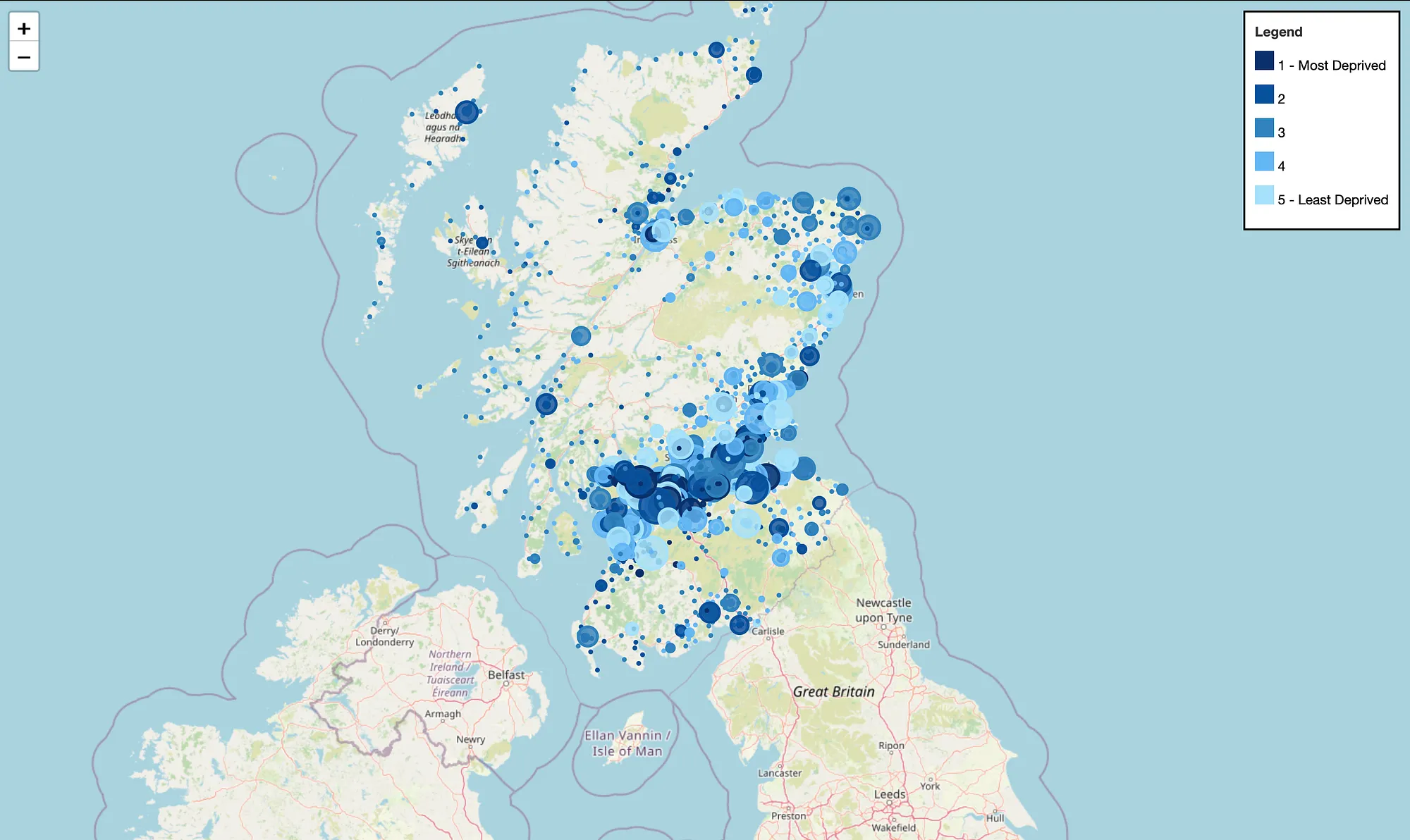
Image 1: Map of Scotland locating all schools (screenshot from the HTML-based app)
The image presented below depicts the appearance of a pop-up menu upon clicking on a school icon (Image 2). The menu exhibits pertinent information such as the school type, local authority, zone, pupils count, and deprivation score.
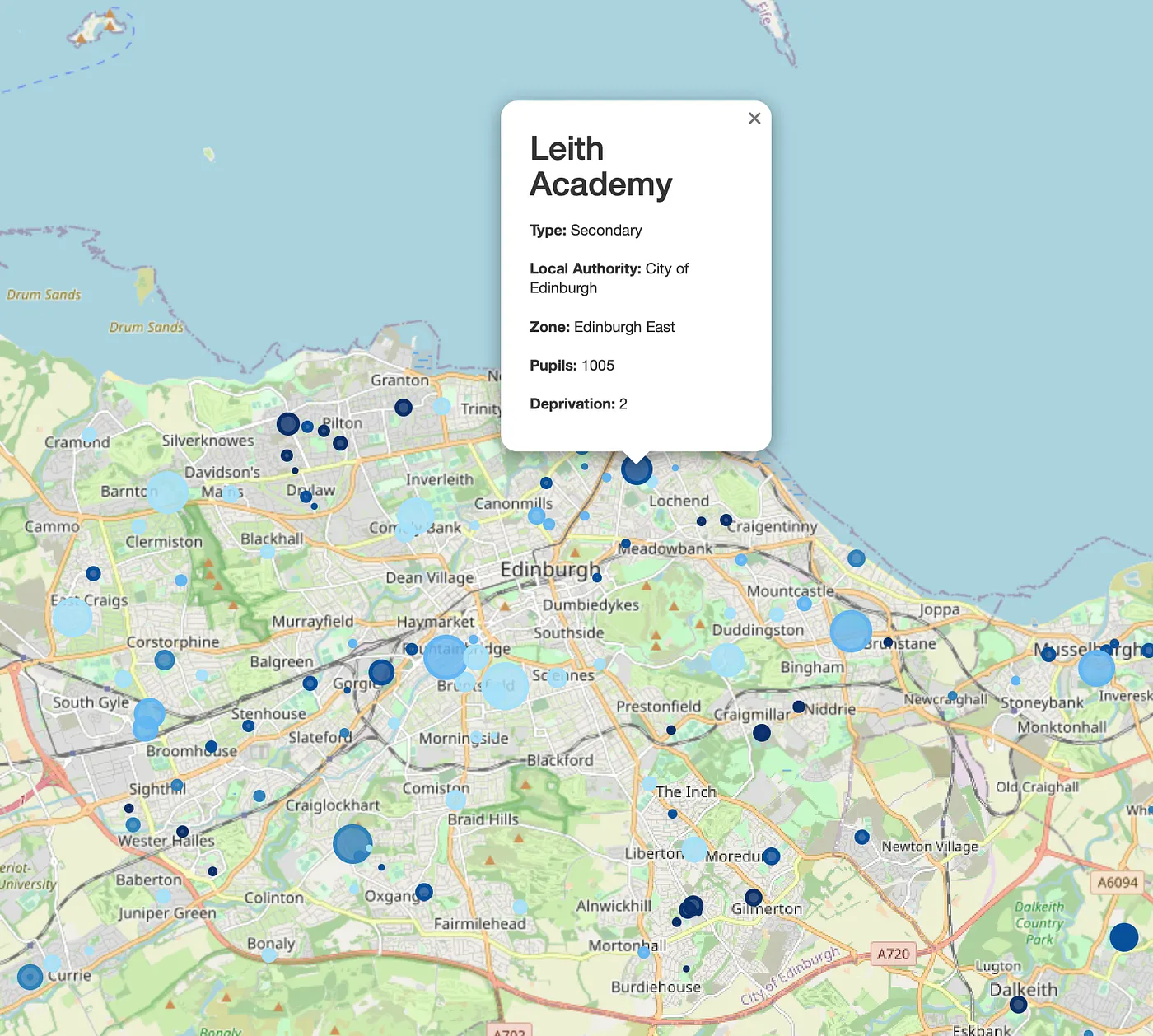
Image 2: A pop-up information menu of Leith Academy (screenshot from the HTML-based app)
End
The objective of this project was to construct a map that would visually represent schools in Scotland, taking into account the number of students and deprivation score. The map was developed using the folium module. The codes and map are available for unrestricted use without my authorization. Please leave a comment if you have any inquiries or recommendations. The map could be enhanced with additional HTML, and possibly Javascript integration.
For information on implementing k-Means clustering to classify school data, please refer to my other article via this link.
For potential collaborations, please contact me at ezeynalli@hotmail.com.